

Circle.so–ColdFusion Integration
Circle.so Integration for a ColdFusion Application
Building a Reusable ColdFusion Integration Layer to Manage a Circle.so Community
Circle.so Integration for a ColdFusion Application
Building a Reusable ColdFusion Integration Layer to Manage a Circle.so Community
1. PROJECT OVERVIEW
The client already operated a mature ColdFusion-based application backed by SQL Server that served as their internal administrative and membership system.
At the same time, the organization was using Circle.so as its online community platform, where members interacted, accessed spaces, participated in discussions, attended events, and consumed community content.
The challenge was that these two systems operated independently.
Administrators had to move between the existing ColdFusion application and Circle.so to perform community management tasks. The client wanted to eliminate this dependency and manage Circle directly from within their existing application.
2. THE CLIENT REQUIREMENT
The requirement was not simply to synchronize two databases.
The client specifically wanted a reusable Circle.so integration that could be plugged into their existing ColdFusion application.
The integration needed to allow the existing application to:
- Retrieve and manage Circle community members
- Invite new members to Circle
- Update member information
- Activate/deactivate member accounts
- Manage member access
- View and manage Circle spaces
- Add and remove members from spaces
- Manage member roles within spaces
- Manage access groups
- View community and space information
- Manage space content and discussions
- Retrieve member profiles, tags and custom profile fields
- Reconcile Circle data with the existing SQL Server membership database
This meant Circle’s API communication, authentication, request handling, error handling, pagination and business logic needed to be isolated from the existing ColdFusion presentation layer.
3. OUR SOLUTION
We designed and developed a modular ColdFusion service layer around Circle.so Admin API v2.
Instead of placing Circle API calls directly inside .cfm pages, the integration was organized into dedicated ColdFusion Components (.cfc), allowing the existing application to consume Circle functionality through reusable service methods.
The architecture was designed so that the Circle integration could operate as an independent gateway between:
Existing ColdFusion Application → Circle Integration Layer → Circle.so Admin API v2
while continuing to work with the client’s existing SQL Server membership database.
Circle officially positions its Admin API for administrative integrations, automations and migration-related tooling, which aligns closely with the client’s requirement for managing Circle from an external administrative application.
4. INTEGRATION ARCHITECTURE
The solution separated responsibilities into focused ColdFusion services rather than creating one large integration component.
Presentation Layer
Existing ColdFusion .cfm pages were responsible for the user interface and administrative workflows.
Circle Integration / Service Layer
Dedicated .cfc services handled communication with Circle:
- CircleConfig
- CircleUserSync
- CircleUserSyncSql
- CircleSpaceService
- CircleSpaceContentService
- CircleSpaceMemberService
- CircleCommunityMemberService
- CircleAccessGroupService
- CircleSpaceStatsCache
The original implementation specifically kept Circle API calls and SQL statements inside this service layer rather than placing them directly in presentation pages.
External Systems
The integration communicated with:
- so Admin API v2
- SQL Server 2022 / existing masteraccnt membership table
The architecture therefore allowed the existing application to continue using its own database while treating Circle as an externally managed community platform.
5.KEY FEATURES DELIVERED
1. Circle Member Management
Administrators could manage Circle community members directly from the existing ColdFusion application.
Capabilities included:
- View Circle members
- Search members
- View individual member profiles
- Create/invite members
- Update member information
- Deactivate accounts
- Manage account status
- View custom profile fields
- Manage tags
- View associated spaces and access groups
This eliminated the need for administrators to repeatedly log into Circle simply to perform routine membership administration.
2. Membership Reconciliation
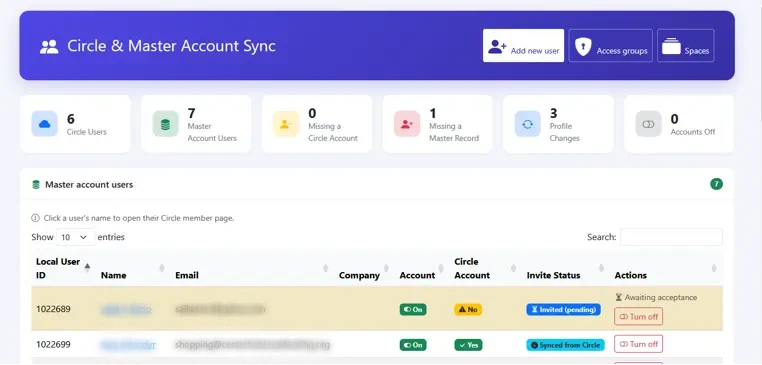
One of the most important workflows was reconciliation between the existing SQL Server membership table and Circle.
The application identified:
- Members existing in both systems
- Members missing from Circle
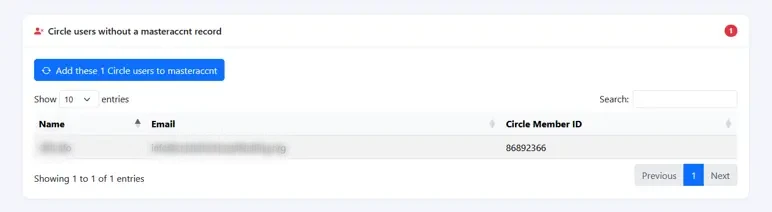
- Members existing in Circle but missing from the legacy database
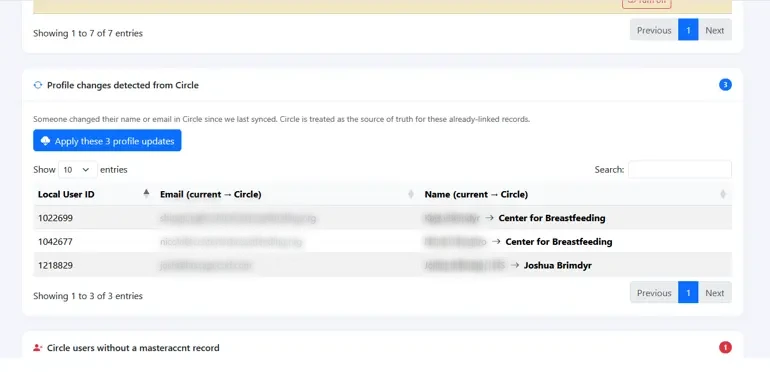
- Profile information that had changed
- Accounts requiring synchronization
Administrators could then take corrective actions from the same interface.
The original implementation included bulk invitations, individual invitations, pulling Circle data into the legacy membership table, applying detected profile changes and account activation/deactivation workflows.
3. Circle Space Management
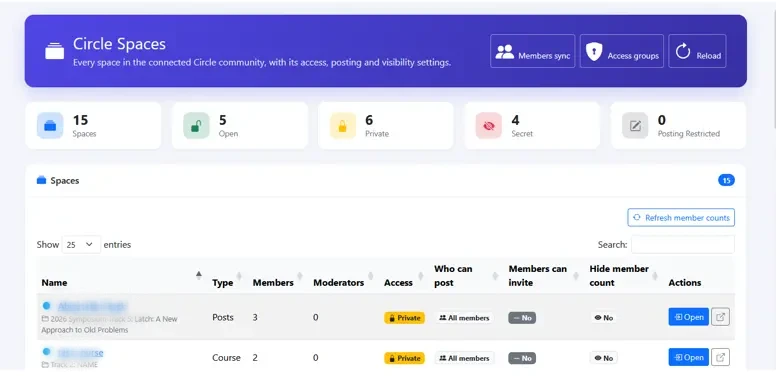
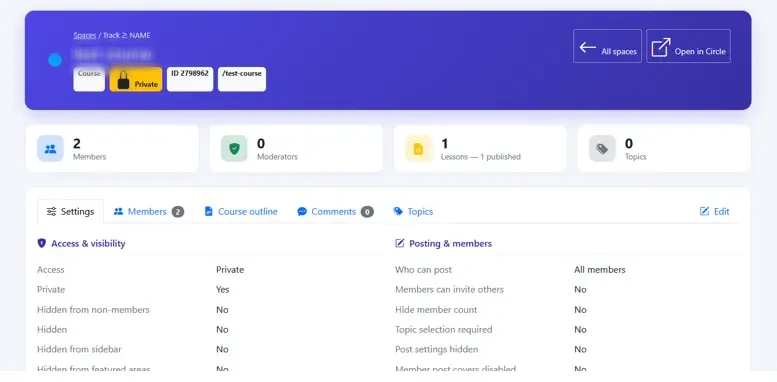
The integration provided a complete browser for the organization’s Circle spaces.
Administrators could view:
- Spaces
- Space types
- Access settings
- Posting settings
- Visibility
- Member counts
- Moderator counts
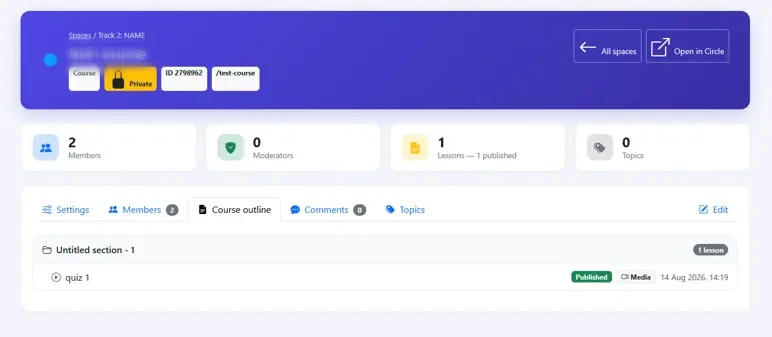
The implementation also provided a detailed space management interface covering settings, members, content, comments and topics.
Circle describes spaces as the core containers used for discussions, courses, events, chat and other community functionality.
4. Space Member Management
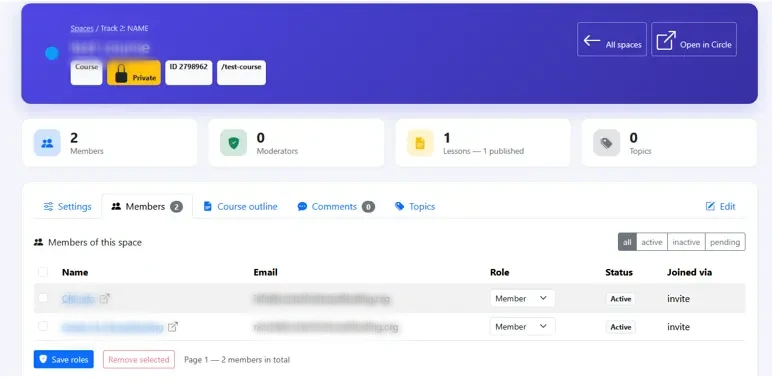
Administrators could manage the relationship between Circle members and individual spaces.
The integration supported workflows such as:
- Add member to a space
- Remove member from a space
- View space members
- View individual space membership
- Manage member roles
This made it possible for the existing ColdFusion application to control community access without requiring administrators to manually perform the same operations inside Circle.
5. Access Group Management
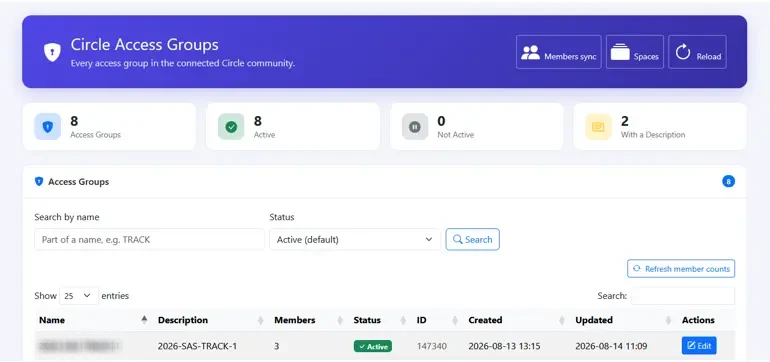
The integration also exposed Circle access groups inside the existing application.
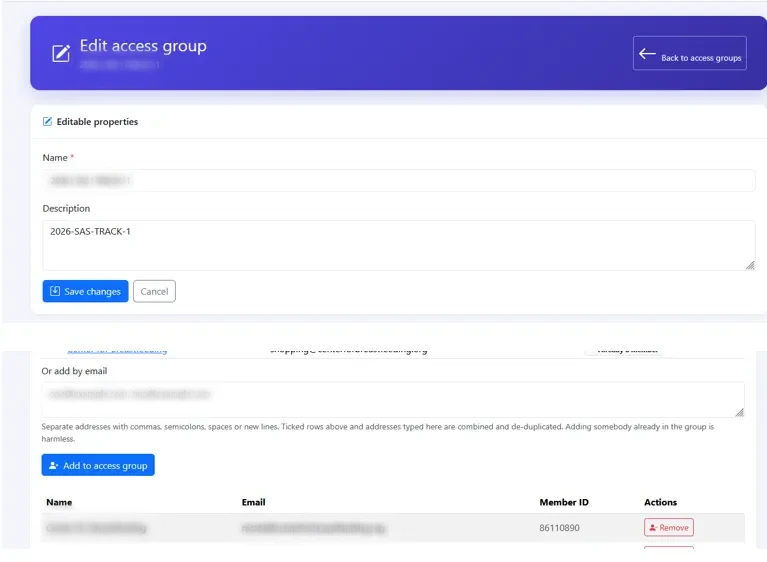
Administrators could:
- View access groups
- View member counts
- Edit access group information
- View group members
- Add members
- Remove members
Circle’s current Admin API v2 specifically provides endpoints for managing access-group membership, including adding, removing and listing members.
6. Community Member Profiles
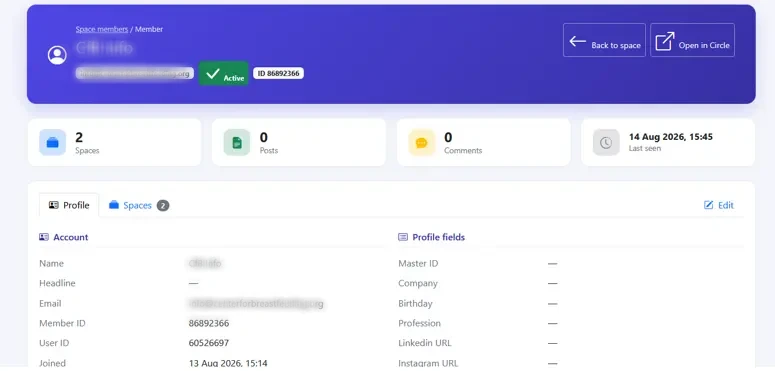
A dedicated member detail interface brought Circle information into the ColdFusion application.
Administrators could view and manage:
- Basic member information
- Profile information
- Custom profile fields
- Tags
- Spaces
- Access groups
- Account status
This provided a single administrative view instead of requiring staff to cross-reference information between two systems.
7. Content and Discussion Management
The integration also exposed Circle content management functionality through the existing application.
Depending on the space, administrators could work with:
- Posts
- Topics
- Comments
- Space content
This extended the integration beyond simple member synchronization and allowed the ColdFusion application to act as an administrative control layer over the Circle community.
6.RESUABLE COLDFUSION INTEGRATION
A major technical outcome of the project was that Circle-specific communication was isolated from the application’s presentation layer.
Instead of implementing API calls directly in individual pages, the application used dedicated ColdFusion components responsible for specific domains.
This made the integration:
- Reusable
- Testable
- Easier to maintain
- Easier to extend
- Independent of individual .cfm pages
- Suitable for integration into an existing ColdFusion application
The configuration layer also kept Circle URLs, endpoint paths, pagination settings, cache TTL and HTTP timeout values outside the application logic.
This was particularly valuable because changes to Circle’s API structure could be accommodated through configuration in cases where endpoint paths changed, rather than requiring changes throughout the application.
7. ENGINEERING CHALLENGES
Working with a Third-Party Administrative API
One of the key challenges was ensuring that the integration behaved correctly against Circle’s actual API rather than relying solely on published documentation.
The team verified API behavior against live Circle endpoints and accounted for undocumented API fields and real-world response behavior.
Synchronization and Data Integrity
The application had to coordinate operations between the existing SQL Server database and Circle.
The integration therefore carefully controlled the ordering of database and API operations so that failures could leave the system in a recoverable state.
Pagination
Circle data can span multiple pages, particularly for members, spaces and other large collections.
The service layer therefore handled pagination rather than assuming that a single API request represented the complete dataset.
Circle Admin API v2 uses page, per_page, has_next_page, count and page_count for paginated responses.
Avoiding Unnecessary API Writes
The integration was designed to send only actual changes.
If an administrator submitted an unchanged form, the application would not unnecessarily issue another update request to Circle.
Configuration-Driven Integration
Circle API configuration was externalized so that base URLs, endpoint paths, pagination limits, cache settings and HTTP timeouts were not hardcoded throughout the application.
8.TECHNOLOGY STACK
| Type | Technology |
|---|---|
|
Backend |
Adobe ColdFusion 2023 / Lucee 6 |
|
Language |
CFML |
|
Frontend |
ColdFusion .cfm |
|
UI |
Bootstrap 5 |
|
JavaScript |
jQuery |
|
Data Tables |
Microsoft SQL Server 2022 |
|
External Platform |
Circle.so |
|
API |
Circle Admin API v2 |
|
Integration Pattern |
Service / Gateway Layer |
9.RESULTS
The completed solution transformed the client’s existing ColdFusion application into a centralized administrative interface for their Circle community.
Administrators could manage Circle members, spaces, access groups and community information without repeatedly switching between systems.
The solution provided:
- Centralized Circle administration
- Automated membership reconciliation
- Reduced manual data entry
- Reduced administrator dependency on the Circle UI
- Better visibility into discrepancies between systems
- Safer member and permission management
- A reusable ColdFusion integration architecture
- A foundation for adding additional Circle functionality in the future
The original implementation specifically achieved full visibility into Circle spaces, access groups, members and content from the existing administrative environment.
10.BUSINESS VALUE
The key value delivered was not simply “Circle synchronization.”
The project enabled the client to extend their existing ColdFusion application to become an administrative control layer for their Circle.so community.
Rather than replacing the client’s existing application or forcing administrators to learn and operate another administrative interface, we integrated Circle directly into the system they were already using.
The reusable service-oriented architecture also means that additional Circle functionality can be incorporated without redesigning the application.
This approach provides a strong foundation for organizations that already have a legacy or custom ColdFusion application but want to incorporate modern SaaS platforms such as Circle.so without replacing their existing technology stack.
11. SCREENSHOTS
Trust and Worth
Our Customers
We are having a diversified portfolio and serving customers in the domains namely Sports Management, Online Laundry System, Matrimonial, US Mortgage, EdTech and so on.
















Would you like to start a project with us?
DAStek team would be happy to hear from you and would love to turn your ‘Imaginations to Reality’.