

Search Technologies: Java Lucene vs CF/Lucee Collections vs RAG
A simple guide to Java Lucene, CF/Lucee Collections, and RAG, including keyword search, semantic search, Plain DB, and Vector DB.

Search Technologies: Java Lucene vs CF/Lucee Collections vs RAG

Choosing the right search and retrieval approach for ColdFusion/Lucee applications
Introduction
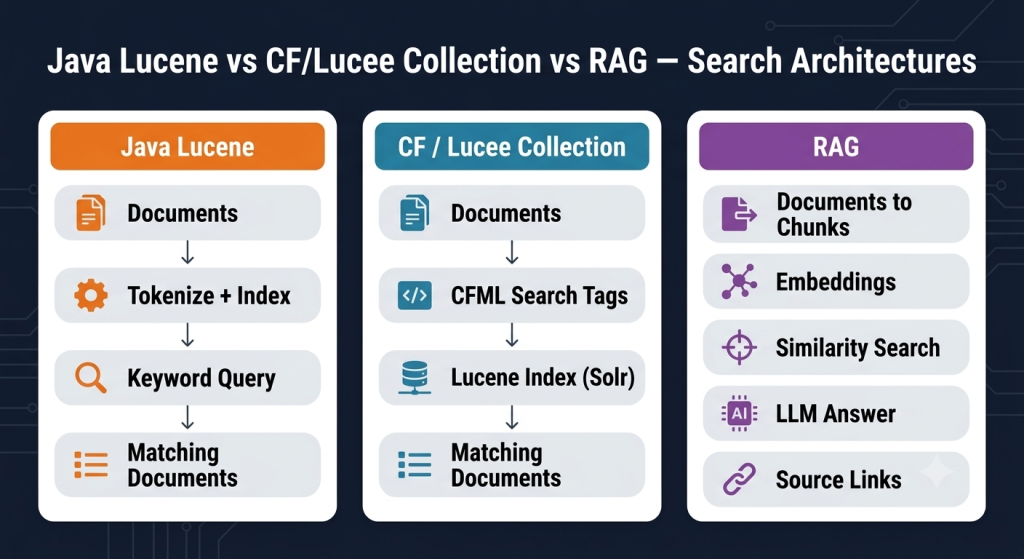
“Search” isn’t just one thing anymore. Keyword search, CFML/Lucee collections, semantic search, and RAG (Retrieval-Augmented Generation) all solve different problems. Here’s the key thing to remember: Java Lucene and CF/Lucee collections are ways to find documents. RAG is a bigger system that finds documents and then uses an AI model to actually write you an answer in plain words.
At a glance
| Approach | What it does | Strength | Typical use |
|---|---|---|---|
| Java Lucene | Builds a fast search index over your text | Very fast, exact keyword matches | Document, website and contract search |
| CF / Lucee Collection | A built-in search feature, used with simple CFML tags | Easy to add to an existing CFML app | Existing ColdFusion/Lucee applications |
| RAG | Finds relevant info, then has an AI write an answer using it | Plain-English answers, based on real content, not guesses | AI assistants, document Q&A, knowledge bases |
1. Java Lucene
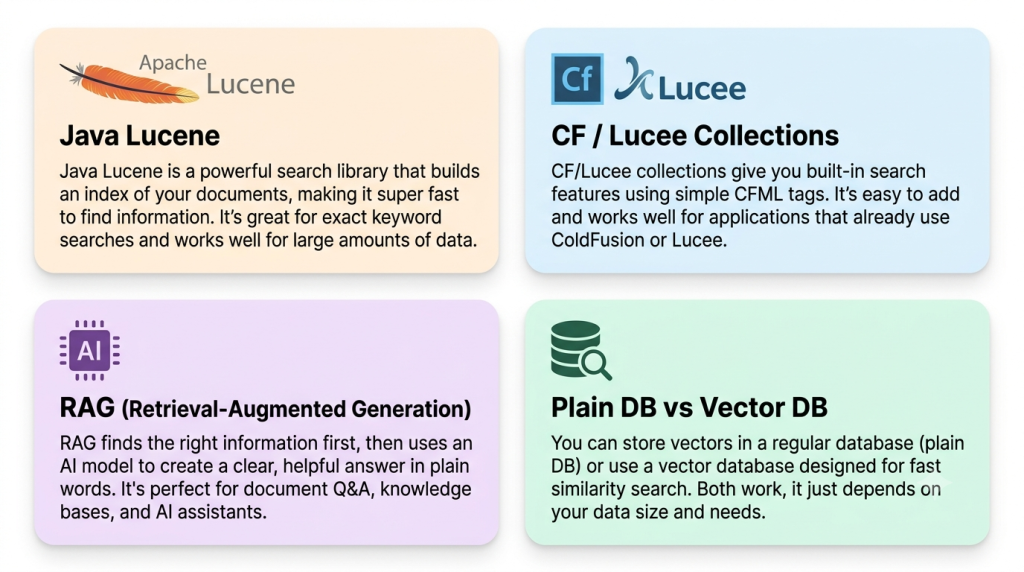
Apache Lucene is a Java library that builds a search index for your documents, much like the index at the back of a book. Instead of reading every page every time someone searches, it just looks up the index and jumps straight to the answer. That’s what makes it so fast, even with huge amounts of text.
What it’s good at:
- Extremely fast at finding exact words
- Handles huge amounts of documents
- Free, open source, and battle-tested
- Great for exact matches, filters, and structured searches
- Doesn’t understand meaning on its own – searching “booking” won’t find “reservation” unless you teach it synonyms
A simple example
This builds a small index with one document, then searches it – the same two steps (StandardAnalyzer, IndexWriter, then IndexSearcher and QueryParser) any real Lucene setup uses, just without the extra layers a production job usually has around it, like pulling files from storage or emailing a progress report.
JAVA LUCENE · index, then search
analyzer = createObject("java","org.apache.lucene.analysis.standard.StandardAnalyzer").init();
dir      = createObject("java","org.apache.lucene.store.FSDirectory").open(createObject("java","java.io.File").init("D:/myIndex").toPath());
writer   = createObject("java","org.apache.lucene.index.IndexWriter").init(dir, createObject("java","org.apache.lucene.index.IndexWriterConfig").init(analyzer));
// Add one document to the index
FieldStore = createObject("java","org.apache.lucene.document.Field$Store");
doc = createObject("java","org.apache.lucene.document.Document").init();
doc.add(createObject("java","org.apache.lucene.document.TextField").init("title", "Contract with Acme Trucking", FieldStore.YES));
doc.add(createObject("java","org.apache.lucene.document.TextField").init("body", "Customer cancelled their reservation.", FieldStore.YES));
writer.addDocument(doc);
writer.commit();
writer.close();
// Now search that index
searcher = createObject("java","org.apache.lucene.search.IndexSearcher").init(createObject("java","org.apache.lucene.index.DirectoryReader").open(dir));
query    = createObject("java","org.apache.lucene.queryparser.classic.QueryParser").init("body", analyzer).parse("reservation");
hits     = searcher.search(query, 10);
for (hit in hits.scoreDocs) {
    found = searcher.doc(hit.doc);
    writeOutput(found.get("title") & " (score " & hit.score & ")");
}
Note: this is written as one standalone block for clarity. In a real setup, indexing and searching usually happen at different times – you index once when a document is added, then reopen the index to search it later, rather than doing both back-to-back in the same request.
2. CF / Lucee Collections
ColdFusion and Lucee give you search built right into the language, through tags like cfindex and cfsearch, so you never have to write Java code yourself. Under the hood it’s still Lucene doing the actual work; you just get a much simpler CFML wrapper around it.
The exact details can differ depending on your ColdFusion or Lucee version, so it’s worth checking your own version’s documentation rather than assuming exactly how it works.
This is the right choice when your app already leans on CFML’s search tags and you mainly need keyword search, not AI-style answers.
A simple example
Same idea as the Lucene example above, just through CFML tags instead of Java code – create the collection once, index a document into it, then search it.
CF / LUCEE COLLECTION · create, index, search
<!--- Create the collection, once --->
<cfcollection action="create" collection="MyCollection">
<!--- Index a document into it --->
<cfindex action="update" collection="MyCollection" type="file" key="D:\docs\contract1.html" title="Contract with Acme Trucking" body="Customer cancelled their reservation.">
<!--- Search it --->
<cfsearch collection="MyCollection" name="qSearch" criteria="reservation">
<cfoutput query="qSearch">
    #title# - Score: #score#<br>
</cfoutput>
Note: cfcollection action=”create” only needs to run once, when the collection doesn’t exist yet – check for it first, as the earlier createCollection.cfm-style pattern does, rather than trying to create it on every request. Everything else here matches how a real search page uses these tags day to day.
3. RAG: Retrieval-Augmented Generation
RAG is a different kind of thing entirely – it’s not just an index you search. It works in two steps: first it finds the pieces of information that seem relevant, then it hands those pieces to an AI model, which writes a proper, natural-language answer using them.
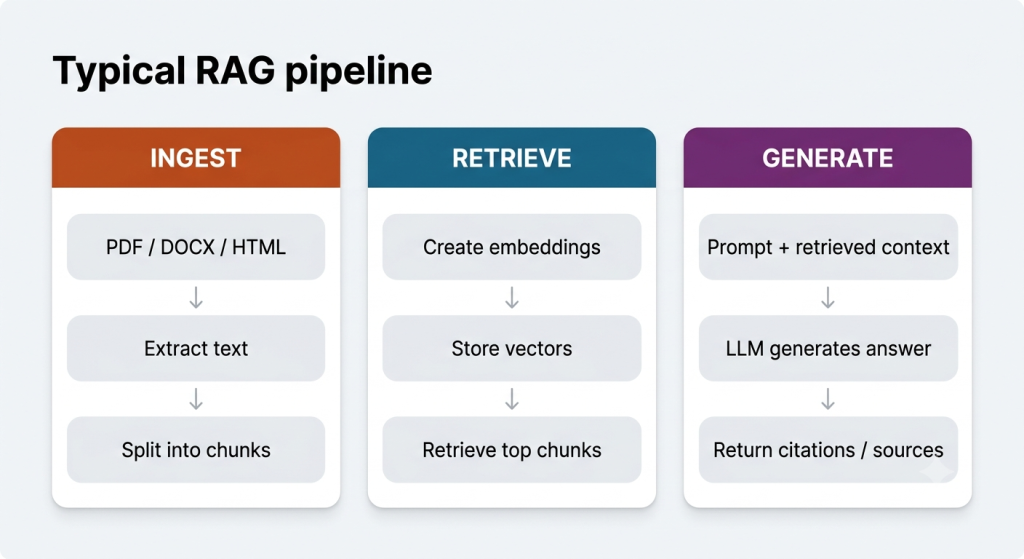
Most RAG systems use “embeddings” (matching by meaning, not just exact words) to find that information, but they can just as easily use plain keyword search instead, or a mix of both. The point is that finding the info and writing the answer are two separate jobs – you can mix and match how the finding part works.
A simple example
Three steps, matching the retrieval-then-generation shape described above: turn the question into a vector, ask Pinecone for the stored chunk whose vector is closest to it, then hand just that chunk to an LLM and ask it to answer using only that text.
RAG · retrieve, then generate
<!--- Step 1: turn the question into a vector --->
<cfhttp url="#embeddingApiUrl#" method="POST" result="embedResp">
    <cfhttpparam type="body" value='{"content":{"parts":[{"text":"#question#"}]}}'>
</cfhttp>
<cfset questionVector = deserializeJSON(embedResp.fileContent).embedding.values>
<!--- Step 2: ask a vector database (Pinecone here, any works) for the closest matching chunk --->
<cfhttp url="#pineconeHost#/query" method="POST" result="queryResp">
    <cfhttpparam type="header" name="Api-Key" value="#pineconeApiKey#">
    <cfhttpparam type="header" name="Content-Type" value="application/json">
    <cfhttpparam type="body" value="#serializeJSON({vector: questionVector, topK: 1, includeMetadata: true})#">
</cfhttp>
<cfset bestChunk = deserializeJSON(queryResp.fileContent).matches[1].metadata.chunkText>
<!--- Step 3: hand the best-matching chunk to an LLM to write the answer --->
<cfset prompt = "Answer using only this text: " & bestChunk & " Question: " & question>
<cfhttp url="#llmApiUrl#" method="POST" result="llmResp">
    <cfhttpparam type="header" name="Authorization" value="Bearer #llmApiKey#">
    <cfhttpparam type="body" value="#serializeJSON({messages:[{role:'user',content:prompt}]})#">
</cfhttp>
<cfset answer = deserializeJSON(llmResp.fileContent).choices[1].message.content>
Note: this example uses Pinecone for Step 2, since that’s the vector database this post recommends earlier. A plain SQL table with a brute-force comparison loop works exactly the same way here, and is a perfectly fine choice at small-to-medium scale – swap Step 2 for a query against your own table if you’d rather start there. Step 3 is written against a generic llmApiUrl on purpose – swap in whichever provider’s chat completions endpoint you prefer (Groq, OpenAI, Claude, or any other), since the request shape shown here is the same across most of them.
Keyword search vs semantic retrieval
Here’s the difference in action. Say a document says: “Customer cancelled their reservation.” A keyword search for “reservation” finds it right away – no surprise there. But a semantic search can also find that same document for the question “How can I cancel my booking?”, even though the word “booking” never appears, because it understands that “reservation” and “booking” mean roughly the same thing.
That doesn’t make semantic search better in every case, though. If someone’s searching for an exact contract number, a specific name, or a precise date, plain keyword search is usually still the better tool.
Where does a vector database fit into a RAG system?
RAG needs a place to store the “meaning” of every chunk of text, in the form of long lists of numbers called vectors. A vector database is a special kind of database built to hold millions of these number-lists and instantly find the ones that are closest in meaning to a new question.
Here’s the part people often miss, though: you don’t actually need one to build RAG.
A vector is really just a list of numbers, something like [0.12, -0.45, 0.89, …]. Two pieces of text that mean similar things end up with similar number lists, even if they don’t share a single word.
A vector database does two things: it stores these number lists, and it quickly finds the closest matches when you search. To search fast even with millions of vectors, it uses a shortcut called HNSW. Think of a library that has already grouped similar books onto the same shelves – you walk almost straight to the right spot instead of checking every aisle.
Without a vector database, you can do the exact same thing the simple way: save each vector as plain text in a normal database column, and when someone searches, load every row, turn the text back into numbers, and compare them one by one with simple math. That sounds slow, but computers are fast – comparing a few hundred or even a few thousand items this way still takes only a blink. The fancy shortcut only really starts to matter once you’re dealing with tens of thousands of items or more.
So in plain terms: a normal database table with a simple comparison loop works perfectly well at small-to-medium scale. A vector database is something you add later, once you actually have enough data to need it – not something you must have on day one.
Here’s a real side-by-side example, using the same chunk of text and the same vector, just stored two different ways:
VECTOR DATABASE · e.g. Pinecone/Chroma-style record
// Vector database record (e.g. Pinecone-style):
{
  "id": "doc_482_chunk_1",
  "values": [0.0123, -0.0451, 0.0089, "..."],
  "metadata": {
    "docId": 482,
    "title": "Support Ticket #482",
    "category": "Billing"
  }
}
PLAIN SQL TABLE · e.g. a document_embeddings row
// Plain SQL table row:
id             1
docId          482
chunkIndex     1
chunkText      "Customer was billed twice for the same invoice
                in March. Requesting refund..."
embeddingJson  "[0.0123, -0.0451, 0.0089, ...]"   // same vector, as plain text
createdOn      2026-07-29 13:59:17
Both records hold the exact same information – a chunk of text, a vector, and a few labels. The real difference is where the text lives: the vector database attaches it as “metadata” right alongside the vector. The plain SQL table keeps it in its own column, in the same row. Same information, just a different home for it.
One thing worth knowing either way: a vector database doesn’t know that several chunks came from the same document – it only sees individual chunks. So if you ask for the “10 best matches,” you might get three chunks from one document and just one from everywhere else, crowding out other good results. The fix is simple: after you get results back, group them by document yourself and keep only the best chunk from each one. No database does this for you automatically.
If you do end up needing one, and you’re calling it from a language like ColdFusion rather than Python or JavaScript, Pinecone is a solid pick – you talk to it with plain web requests, and its free plan doesn’t expire. Some other options, like Chroma, are built mainly for their own Python/JavaScript toolkits, so using them from anywhere else is more of a workaround.
4. Why hybrid search is often useful
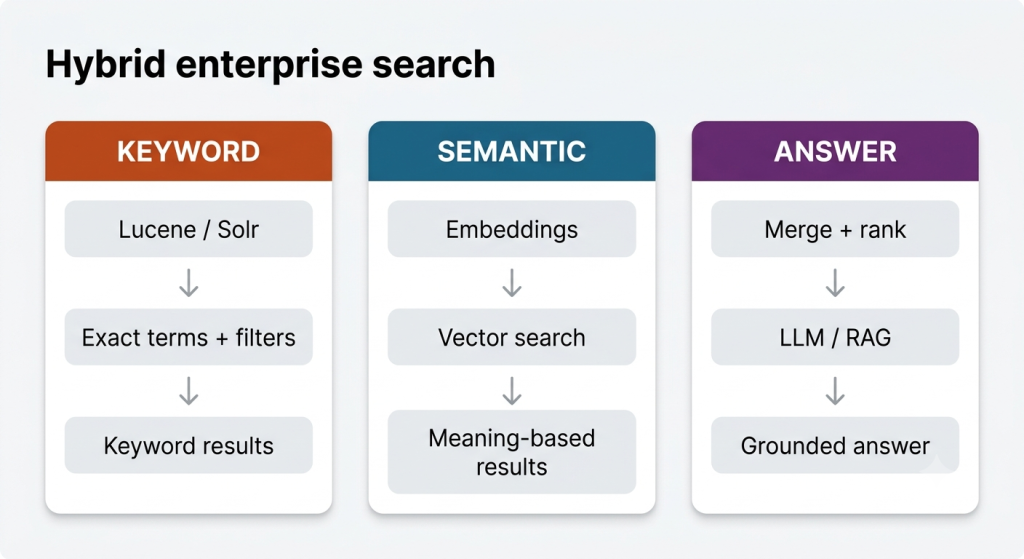
- Keyword search nails exact matches and filtering.
- Semantic search finds related content even when the wording is completely different.
- A hybrid layer combines both sets of results and ranks them together.
- An AI model then takes the best of those results and turns them into a clear, friendly answer.
Where each approach fits
| Requirement | Lucene | CF/Lucee Collection | RAG |
|---|---|---|---|
| Exact keyword search | Strong | Strong | Can be included, but not its main job |
| Natural-language questions | Only if you design for it | Only if you design for it | Strong |
| Search existing CFML application | Needs extra setup | Fits right in | Needs extra AI setup |
| Answer questions from documents | Just finds documents | Just finds documents | Designed for this |
| Exact IDs / codes / filters | Strong | Strong | Best paired with keyword search |
| Generative answer | No | No | Yes |
Practical recommendation for a ColdFusion/Lucee project
Start with what you actually need, not with whichever technology sounds most exciting. Need fast keyword search across documents or a website? Go with Lucene. Already using CFML’s built-in search tags and they cover what you need? Stick with that – it’s less work. Do people need to ask questions in plain English and get answers pulled from your own documents? That’s when you add RAG.
For bigger systems, combining all three – keyword search, semantic search, and an AI model – often works best. That way exact lookups and natural-language questions can both be handled well, instead of forcing one method to do a job it isn’t great at.
Important RAG implementation considerations
- Break documents into sensible chunks before turning them into vectors, not just a fixed number of characters.
- Keep the document’s ID, title, and file path saved alongside each chunk.
- Set a minimum match-quality bar, so weak, irrelevant matches don’t get handed to the AI as if they were real answers.
- Remember your search will usually return chunks, not whole documents – you may need to group them back together yourself so the same document doesn’t show up more than once.
- Always show where an answer came from, so people can check the source themselves.
- Judge the search quality and the AI’s writing quality separately – a bad answer might mean bad search, not a bad AI model.
Conclusion
Java Lucene, CF/Lucee collections, and RAG aren’t three versions of the same thing – they solve different problems. Lucene is a search engine. CF/Lucee collections are a CFML-friendly way to use that same engine. RAG is a whole different pattern: find information, then have an AI turn it into a real answer. Which one, or which combination, you need depends entirely on what your users actually have to do.
Trust and Worth
Our Customers
We are having a diversified portfolio and serving customers in the domains namely Sports Management, Online Laundry System, Matrimonial, US Mortgage, EdTech and so on.
















Would you like to start a project with us?
DAStek team would be happy to hear from you and would love to turn your ‘Imaginations to Reality’.