

MemberPress API Reference
An overview of how the api integration manages members, memberships and access through MemberPress.

MemberPress API Reference

Overview:
The integration connects the application with the WordPress site through the MemberPress Developer Tools API. It provides the core capabilities needed to manage member accounts, membership products and membership-based access. One important distinction is that creating a member and granting access are separate operations. A user can have a valid WordPress account but still have no access to protected content until a membership is assigned.
What These APIs Do:
A quick-reference summary of every endpoint covered in this document, and what it’s used for. Full detail, parameters, and examples for each follow below.
| Method | Endpoint | What it does |
|---|---|---|
|
GET |
/me |
Checks that the API key is valid |
|
GET |
/members
|
Lists WordPress users known to MemberPress, including their active memberships, address, and recent activity. |
|
GET |
/members/{id} |
Fetches the full record for one member.
|
|
POST |
/members
|
Creates a new WordPress user account. Does not, by itself, grant any access.
|
|
PUT |
/members/{id} |
Updates one or more fields on an existing member without disturbing the rest of the record.
|
|
GET |
/memberships
|
Lists all membership products configured on the site.
|
|
GET |
/memberships/{id}
|
Fetches the full configuration – pricing, billing period, trial settings – for one membership product.
|
|
GET |
/transactions
|
Lists all transactions on the site, paged.
|
|
POST |
/transactions
|
Grants access: records a completed transaction against a membership, which is what actually unlocks content for a member.
|
|
DELETE |
/transactions/{id} |
Revokes access by removing the transaction that granted it.
|
Authentication:
All calls go to the mp/v1 namespace, provided by the MemberPress Developer Tools add-on. Authentication is a single header carrying an API key generated in WP Admin -> MemberPress -> Developer -> API Keys.
Base URL: https://cfbsas.org/wp-json/mp/v1
Every request
MEMBERPRESS-API-KEY: your_api_key
Content-Type: application/json
GET /me
Confirms the key is valid.
curl |
Members:
GET /members
Lists WordPress users known to MemberPress. Each record carries far more than the user row – active memberships, address, custom profile fields, transaction counts and recent activity – so one call usually removes the need for several.
| Parameter | Notes |
|---|---|
|
page, per_page |
Paging. per_page=100 is a safe maximum.
|
|
search[id] |
Exact member id.
|
|
search[email] |
Exact email.
|
|
search[username] |
Exact username. |
|
orderby, order |
e.g. registered_at with DESC.
|
curl
curl -s “https://cfbsas.org/wp-json/mp/v1/members?per_page=100&page=1”
-H “MEMBERPRESS-API-KEY: your_api_key”
Response –
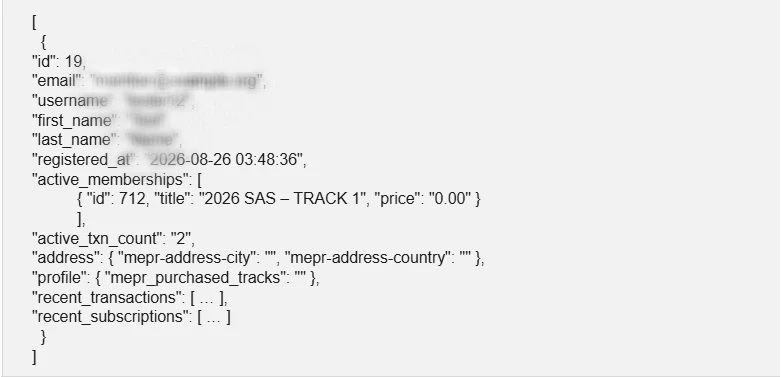
GET /members/{id}
The record for one member, returned as an object rather than a single-element array. A member that does not exist returns 500 with
mp_no_records_found.
curl |
POST /members
Creates a real WordPress user. Irreversible through this API in any tidy way, so treat it as a committed action.
| Field | Notes |
|---|---|
|
email required |
Must be unique across WordPress.
|
|
username required |
Must be unique. See the collision quirk below.
|
|
password |
Auto-generated when omitted – which is what you want alongside the email below.
|
|
first_name, last_name |
Optional. |
|
address1, address2, city, state, zip, country, phone |
Optional address block. |
|
send_password_email |
Defaults to false. Send true or the member is never told the account exists. |
|
transaction |
Nested transaction to create alongside the member.
|
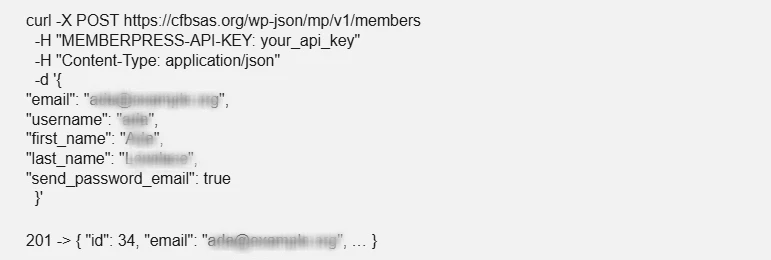
PUT /members/{id}
Updates one or more fields on an existing member without disturbing the rest of the record. Accepts the same fields as create, except password. Omitted fields are left alone rather than cleared, so a partial update is safe – confirmed by sending a single field and re-reading the record.
curl # re-send the set-password email for an account created without one |
Memberships
A membership is a product, and in practice it is also the access group: holding one is what grants access to the content and community areas configured against it.
GET /memberships
All membership products.
curl [ |
GET /memberships/{id}
One product with its full configuration – pricing, billing period, trial settings, group.
A membership that has been deleted fails here while members still carry it in active_memberships. Any membership detail view needs to cope with the product being gone and fall back to what the member records say.
curl |
Transactions
GET /transactions
Paged list of all transactions. The member and membership fields arrive as either a nested object or a bare id depending on the record, so normalise both.
search[membership] and search[member] do not filter. They return an empty array even when matching records exist. Fetch all pages and filter client-side.
curl |
POST /transactions
This is how access is granted. Creating a member alone leaves them with nothing; recording a completed transaction against a membership is what unlocks the content and community areas tied to it.
| Field | Notes |
|---|---|
|
member required |
Member id. Not validated – see quirks. |
|
membership required |
Membership id.
|
|
amount |
Send “0.00” explicitly for a computed grant.
|
|
status |
complete for access to take effect.
|
|
gateway |
manual for an administrative grant.
|
|
expires_at |
Omit to inherit the membership’s period. Lifetime products report 0000-00-00 00:00:00. |
|
send_welcome_email |
The membership welcomes email. Lives here, not on the member. |
curl -X POST https://cfbsas.org/wp-json/mp/v1/transactions -d ‘{ |
DELETE /transactions/{id}
Removes a transaction, revoking the access it granted. Returns true.
curl |
Trust and Worth
Our Customers
We are having a diversified portfolio and serving customers in the domains namely Sports Management, Online Laundry System, Matrimonial, US Mortgage, EdTech and so on.
















Would you like to start a project with us?
DAStek team would be happy to hear from you and would love to turn your ‘Imaginations to Reality’.